
Akka Streams Getting Started
Intro
Hi, everyone. There has been a long time from my last post. In this post, I want to introduce you to the Akka Streams library which I considered is an awesome and powerfull tool for writing asynchronous pipelines of data transformation. In this intro, I want to show you what Akka Stream is, what problems it solves, where it can be a good fit, what are its basic building blocks, and an intro to the Alpakka project through a real world example.
Before talking about Akka Streams, it is important to know what streams are.
What are streams?
Imagine you are working on a method that receives a list of transactions and performs some kind of calculation. If you receive 100 elements there may be no problem. But what if the app grows and you start receiving 10k, 100k or even more transactions each time. Generally, collections are data structures that needs to be fully loaded in memory before processing.
So, there are scenarios when processing the data as a whole is not an option. Another example of this can be processing or even serving a big file.
Stream data processing is a way of dealing with data transformation that resembles how computers internally work (at the end, everything is a flow of bytes that flows from a computer into another, or through different tiers of the same computer). In a streaming pipeline, elements flow from an origin to a destination, being emitted one at a time, passing through different intermediate transformations.
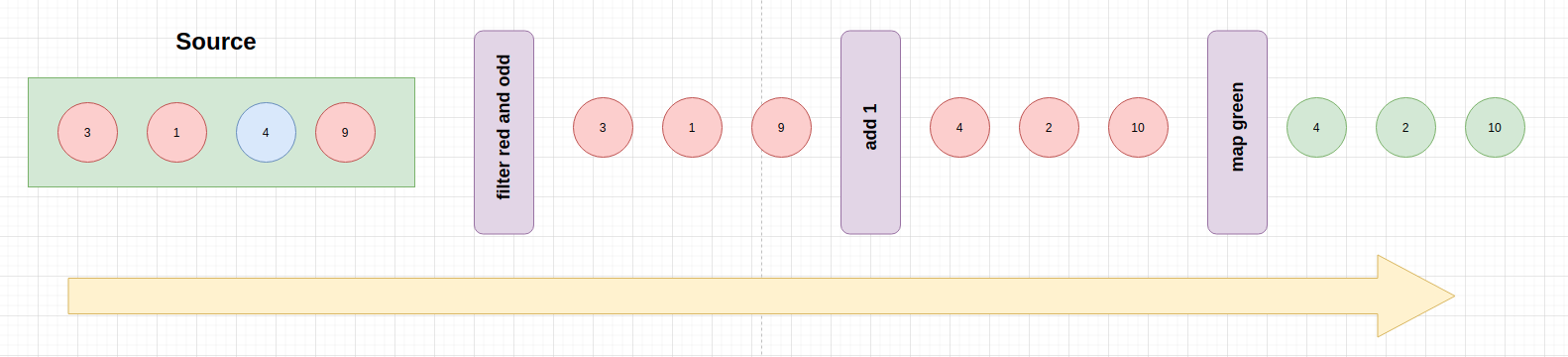
Akka Streams
Akka Streams is a library for building asynchronous pipelines of data transformation.
It has many goals but the most important ones are the following:
- to offer an easy way of formulating stream processing pipelines that feels like working with collections.
- component reutilization (stream components can be reused in many other streams because all them are just descriptions)
- bound resource usage through back-pressure (more on this later).
Why not just using plain Actors?
Of course, you can implement asynchronous streaming processing pipelines just using Actors. In that case, you would have to deal with the following issues:
- actor mailboxes are unbounded by default, so you have to manually control the message flow, otherwise, you can have an overflow.
- messages can be lost and it is up to you to implement some retransmition mechanism.
- implementing error handling by hand.
- lots of boilerplate because of manually implementing the previous features.
Akka Stream use cases
- Batch processing
- Event Driven Architectures
- Realtime Applications (such as MMO Servers, chat servers, SSE)
- IoT
Or whenever you have to manipulate data as a pipeline or deal with potentially infinite data flows.
Akka Streams vs Reactive Streams vs Reactive Systems
Quoting the Reactive Streams documentation: Reactive Streams is an initiative to provide a standard for asynchronous stream processing with non-blocking back pressure.
So, Reactive Streams is an specification of how to deal with asynchronous boundaries without data lost or resource exhaustion.
In contrast, Akka Streams is an API that is compliant with that specification, but it offers its own API which is most suitable for end users. Remember, Akka Streams is all about building/expressing asynchronous pipelines and component reutilization.
On the other hand, Reactive Systems is a more broader topic. It is about building reactive system architectures as a whole, being compliant with a series of postulates that guarantees responsiveness, fault tolerant, loosed-coupled and scalable systems. In comparison, Akka Streams could be seen as a tool that can help you to build reactive systems.
Now, we are more clear about what Akka Stream is, but before diving into its API, we need to talk about Back pressure
Backpressure
Streams are similar to producer-consumer architectures, where elements are emitted by a producer and consumed by consumers. In those arquitectures, we can lead to the following scenarios:
- slow producer and fast consumer
- fast producer and slow consumer
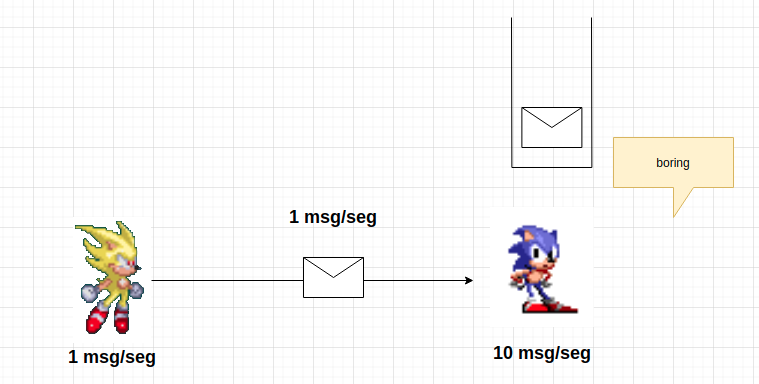
The first scenario is acceptable. There’s no problem having a slow producer. In that case, at least the consumer will be idle, but there’s no buffer overflow risk.
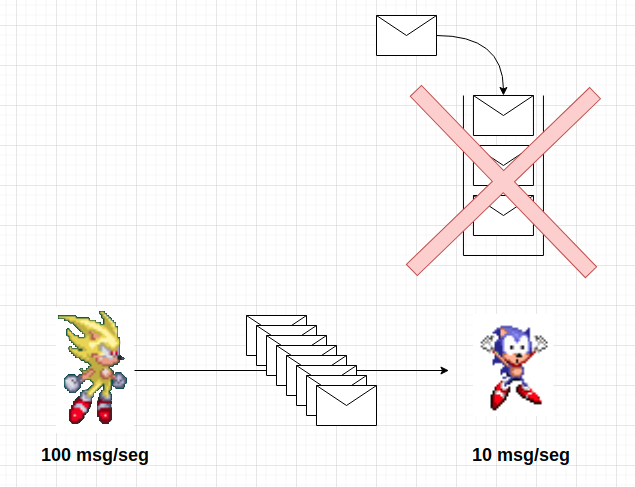
However, the second scenario is something we want to be cared about. If we have a fast producer and a slow consumer, it will lead to a situation where the consumer’s buffer got overflowed. Back-pressure comes to solve this problem.
Back-pressure is a flow-control mechanism where the consumer signals the producer with the amount of elements it is able to handle. In order words, it is a comunication from consumer to producer, where the first one signals the demand it can process. That way, producers can adjust their rate of emitting elements.
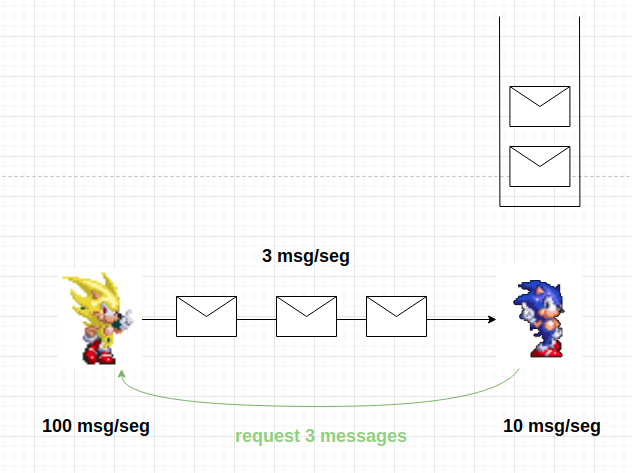
It’s important to mention that all this comunication between producers and consumers is asynchronous.
In a backpressure scenario, the producer is signaled with the amount of messages (demand) the consumer is able to handle. In order to accomplish it, the producer can implement one of the following strategies:
- stopping emitting messages (if possible)
- buffering elements until suscriber signals that more elements can be emitted
- dropping elements
- tear down the stream if none of the previous strategies could be applied.
Now, we are ready to write our first graph (remember this term).
Dependencies and getting started
First of all, the following dependecies should be added to your build.sbt:
val AkkaVersion = "2.6.14"
libraryDependencies += "com.typesafe.akka" %% "akka-stream" % AkkaVersion
Lets create a new object and place the needed imports and infrastructure for running streams:
import akka.actor.ActorSystem
import akka.stream.scaladsl._

object GettingStarted extends App {
  implicit val system = ActorSystem("GettingStarted")
}
Why we need an ActorSystem here? We’ll answer that question along this tutorial.
Main stream components
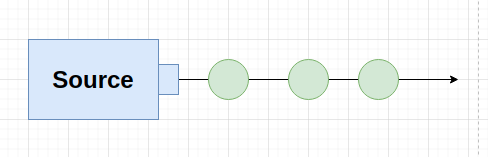
Source is the beginning of the stream. Its purpose is to emit elements (because of that, it just has output).
val source: Source[Int, NotUsed] = Source(1 to 1000)
The first type parameter refers to the type of value the Source emits. The second one refers to the materialized value type (more on this later).
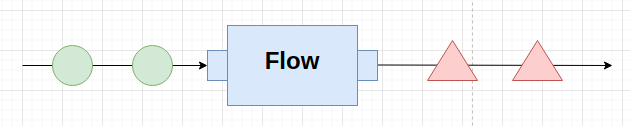
Flow is an intermediate step that performs transformations over the elements it receives. So, it has input and produces output. For example:
val addOne: Flow[Int, Int, NotUsed] = Flow[Int].map(x => x + 1)
The first two parameters refer to the input and output types, respectively. The last one is the type of the materialized value.
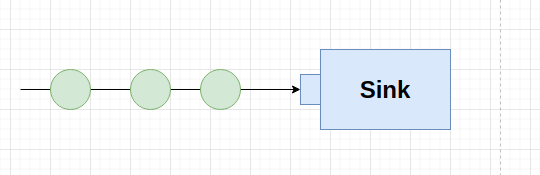
Sink is the final piece of your graph. It is the susbcriber to data sent by the Source. A Sink just has input data a produce no output:
val sinkPrintln = Sink.foreach(println)
When we have all our components connected, we say that we have a RunnableGraph, or a graph, for short. A graph is the topology built by connecting a source to a sink, passing through different intermediate transformation/processing steps (flows). It is important to know that a graph is just a description (a blueprint) of the pipeline. Nothing has happend yet (no resources have been assigned or processing has been started).
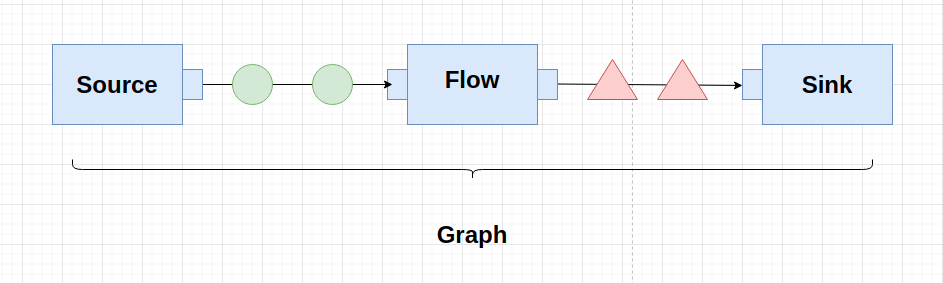
It’s all about component reutilization
Of course, you can write a graph and run it all in the sample place:
Source(1 to 100)
  .map(x => x + 1)
  .map(x => x * x * x)
  .map(e => s"num: $e")
  .runWith(Sink.foreach(println))
But, you can build reusable pieces and then connect it together to form a graph:
val sourceList = Source(1 to 1000)

val addOne = Flow[Int].map(x => x + 1)

val cube = Flow[Int].map(x => x * x * x)

val toLine = Flow[Int].map(number => s"num: $number")

val sinkPrintln = Sink.foreach(println)
Then you can connect all these pieces together and running the graph:
val graph = sourceList
  .via(addOne)
  .via(cube)
  .via(toLine)
  .to(sinkPrintln)

graph.run()
It comes in handy if you, for example, require to build a different graph whose only difference is that it sinks to a filed instead of console.
val lineToBytes = Flow[String].map(line => ByteString(s"$line\n"))

val sinkToFile = FileIO.toPath(Paths.get("result.txt"))

val graph = sourceList
  .via(addOne)
  .via(cube)
  .via(toLine)
  .via(lineToBytes)
  .to(sinkToFile)

graph.run()
If we see that different sequences of transformations repeats frequently we can also create new reutilizable pieces (source, flow, sinks) by connecting them:
val numberConverter = addOne.via(cube).via(toLine)

// combination of linetToBytes (flow) with sinkToFile, creating a new Sink.
val sinkLineToFile: Sink[String, NotUsed] = lineToBytes.to(sinkToFile)

val graph = sourceList
  .via(numberConverter)
  .to(sinkLineToFile)

graph.run()
So, you can see that is very easy to define reutilizable pieces. It is up to you to decide how to combine them and what fits better with your use case.
Materialization
An stream is a description. It is just a blueprint of the processing you want to perform. At that point we are not allocating any resource. The process that takes our stream description and allocates all the resources it needs is called Stream Materialization.
Materializer is the component that has the responsility of initializing all the required resources our stream needs in order to run. Most of times, it means starting actors (remember, streams are backed by actors), but it can also mean oppening TCP connections, files or allocating another kind of resource.
A Materializer is bringed into scope through the ActorSystem. So, having an ActorSystem in scope is enough to run your graphs.
Materialized value
What happens inside a stream stays inside it.
What I’m trying to say is that when running a stream there is no observable effect outside. The effectful part happends in the Sink, which is the consumer side of the stream, but not in other places of the external world (if you sink to a DB, the change will be reflected on the DB, if you sink to a Kafka topic, that change will be reflected there but not somewhere).
However, there are situations when you want the stream to give you some information regarding processing. In that case, you need a Materialized value.
A Materialized value is an auxiliary value emitted from the stream to the outside world. It is a value that the stream “expose” to us when running.
Every graph component (Source, Flow and Sink) can emit materialized values. The type of the materialized value that a component can emit is indicated by its last type parameter. Example:
val sourceList: Source[Int, NotUsed] = Source(1 to 1000)      // it emits no meaningful value to the external world

val addOne: Flow[Int, Int, NotUsed] = Flow[Int].map(x => x + 1) // it emits no meaningful value to the external world

val sinkToFile: Sink[ByteString, Future[IOResult]] = FileIO.toPath(Paths.get("result.txt")) // emits a file
If every element can emit a materialized value, how we can decide which one to pick? In this case, the API is very flexible and it give us the possibility to chose what value to take. Akka Streams API give us the methods via, to, viaMat, toMat for connecting components together. Those methods especify which materialized value we will take.
via connects a Source with a Flow materializing the value of the Source (the left value).
val combinedSource: Source[ByteString, NotUsed] =
  sourceList.via(convertToByteString) // materialize the value of sourceList (the left hand value) which is of type NotUsed
to connects a Source with a Sink materializing the left hand value (the value of the Source).
val graph: NotUsed = combinedSource.to(sinkToFile).run() // materialize the left side value (the value of the source)
If you need more flexibility, you can use viaMat and toMat methods, which a allows more control of the materialized value by passing a function which defines what value to take:
// via mat
val combinedSource = sourceList.viaMat(addOne)((mat1, mat2) => mat2)

// this example is equivalent to the previous one but using `Keep.left` function
val combinedSourceKeepingLeft = sourceList.viaMat(addOne)(Keep.left)

// toMat
val result: Future[IOResult]] = combinedSource.toMat(sinkToFile)(Keep.right).run()
In the last example we choose to materialized the right hand value, so will get a file after running this stream.
Also, the runWith method (available on Source, Flow and Sink) takes an specific side depending of the component who calls it. For example: if it is called from a Source, it materializes the Sink value. If it’s called from a Sink, it materializes the Source value. If its called from a Flow, it materializes both.
Alpakka
Alpakka project is an open source iniciative for creating connectors that are compliant with Reactive Streams specification and that allow us to create reactive integration pipelines. Those connectors are built on top on Akka Streams so they can together very easily.
Alpakka project offers reactive connectors for different technologies such as Kafka, JMS, Slick, AWS services (e.g., Kinesis, DynamoDB, etc), Google Cloud Services, among others. In the next section we’ll use the Slick connector in order to define a graph that streams JDBC query result set downstream.
A minimal real world example
Now that we know the basics of Akka Streams, it is time to see how we can use this tool to solve real world problems (some minimal examples in this case, but we’ll see a more elaborated one in the next post).
Imagine that we work on a payment processor system which stores information about transactions that were made against credit card companies (e.g., VISA, AMEX, etc). It stores some info about the transaction, which include payment info and the operation result (e.g., approved, rejected). The following case class ilustrates our model:
case class Transaction(
    id: Option[Long],
    amount: BigDecimal,
    cardNumber: String,
    dateTime: String,
    holder: String,
    installments: Int,
    cardType: String,
    status: String,
    email: String)
Imagine that we are asked to retrieve the accumulated amount of an specific user by email. We can query the data base in a traditional way, loading all the result set in memory before calculating the total, but we can also do this in a streamed-buffered way which would made a more efficient use of resources. So, let’s try to implement this requirement using Akka Streams.
val clientBalanceOutputFile = Paths.get("client-balance.txt")

Slick
  .source(transactionTable.filter(t => t.email === "conception.hessel@gmail.com" && t.status === "approved").result)
  .fold(BigDecimal(0))((acc, tx) => tx.amount + acc)
  .map(amount => amount.toString)
  .map(line => ByteString(line))
  .runWith(FileIO.toPath(clientBalanceOutputFile))
In this case, our Source is a Slick query which emits elements (Transactions) downstream. As we mentioned in the last section, it is important to note that this is a connector that comes from the Alpakka project, so it is compliant with the Reactive Streams especification. So we can connect it to our pipeline in order to have a full reactive graph. The rest of the graph is very simple. We perform operations in a way that is similar than working with collections (we reduce the transactions with a fold operation, then convert the result to a Bytestrig and finally sink it to a file).
Imagine now that we are required to calculate the total amount of approved payments that were processed by every card brand. No problem, we can also implement this stuff using Akka Streams.
val brandBalanceOutputFile = Paths.get("brand-balance.txt")

Slick
  .source(transactionTable.filter(_.status === "approved").result)
  .groupBy(10, _.cardType)
  .fold((EMPTY_CARD_TYPE, BigDecimal(0)))((acc, tx) => (tx.cardType, tx.amount + acc._2))
  .mergeSubstreams
  .map(cardTypeAndTotal => s"cardType: ${cardTypeAndTotal._1}, total: ${cardTypeAndTotal._2}")
  .map(line => ByteString(line + System.lineSeparator()))
  .runWith(FileIO.toPath(brandBalanceOutputFile))
In this case we start querying for approved transactions. Then, we group transactions by card type (aka: brand). It creates a Substream for every card brand and then we perform a fold operation on each of them in order to get the totals. After that, we merge all those substreams in order to comming back to the original graph by emit downstream all the totals we got and doing some formatting operations. Finally, we sink to a file.
Note: in order to keep the example simple, I used a tuple in the accumulator element of the fold operation inside the Substream, instead of a more elaborated zipWith like operation.
Conclusion
In this tutorial we have seen what Akka Stream is and what problems it solves. However, some topics were missing, such as logging, error handling, testing and some operators. Those topics will be covered in future posts. Also, I want to write a dedicated one about working with Graph DSL, which is a powerful API that Akka Streams provide us in order to write no linear asynchronous pipelines. The sample code is available on GitHub.